If you have a recent version of Microsoft Word, you can use it to check your basic spelling and grammar in French. To do this, you need to follow the steps below.
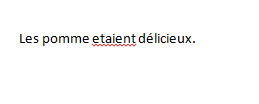
If you are just starting to produce your text in Word, follow these steps, as the example below illustrates. Let's assume you typed this:
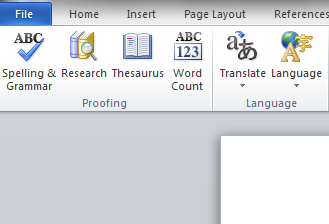
To check this, click on the Spelling and Grammar button
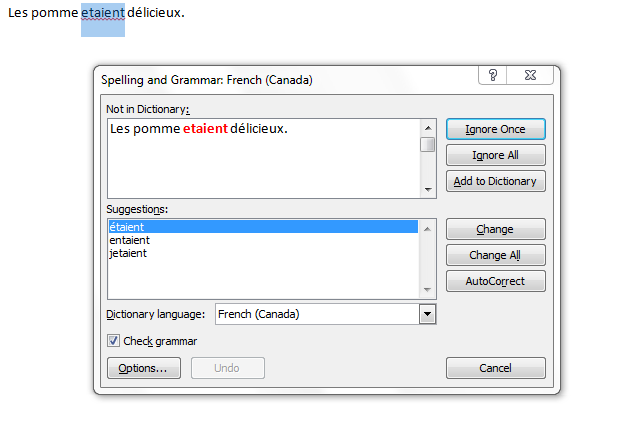
Make sure the Check grammar box is checked and that the Dictionary language is set as French (Canada) and you will see some possible errors noted in red, and some suggested corrections.
Either accept these by clicking on the Change button, or refuse them by clicking on the Ignore button.
The verb is now corrected, and you will then see something like this:
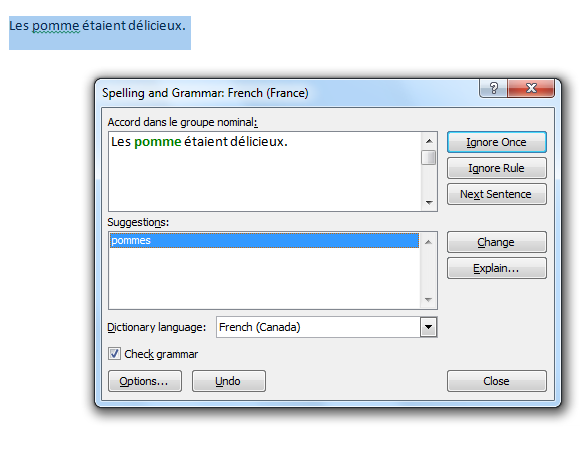
If you accept this correction, you will see:
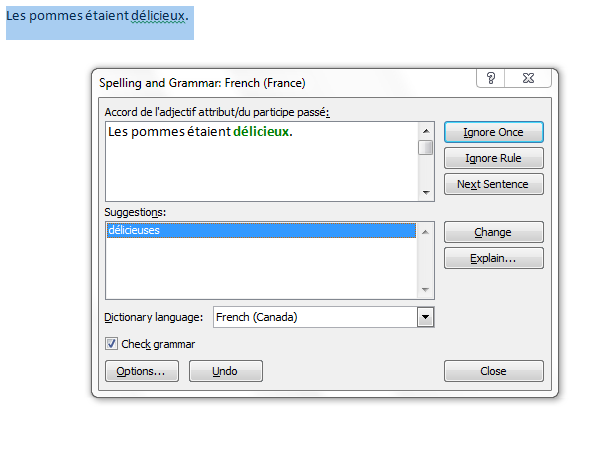
If you accept this correction, your text will then be grammatically correct.
If you have already produced your text, but not using a French keyboard:
You will notice that Word's grammar checking is basic and functional. Remember though that you are using a computer. They are powerful but stupid, so use your own judgment as well. Also, keep in mind that Word's French dictionary does not contain all proper names and therefore unknown names appear as mistakes. You need to use the Add button to add the word to the Dictionary. Double check the spelling to avoid adding a mistaken word to your dictionary.
If you want a more powerful grammar checker, use Antidote, available on the Kingston Hall semi-public site machines. Instructions for using Antidote can be found here.